Programmer
CH341A Windows Software Guide: AsProgrammer, NeoProgrammer
The CH341A is a cheap, popular USB chip used in mini programmers (especially the black or green “MiniProgrammer” boards with ZIF socket) for reading, writing, erasing, and verifying SPI Flash (25-series), I²C EEPROM (24-series), and some Microwire (93-series) chips. Common uses include BIOS recovery, firmware dumping/flashing, and EEPROM work on motherboards, routers, set-top boxes, etc.
AsProgrammer and other Windows utilities for CH341A
Official manufacturer software is limited or restricted, so the community relies on several free/open-source Windows tools. Here’s a practical overview of the main ones.
1. AsProgrammer (recommended open-source GUI)
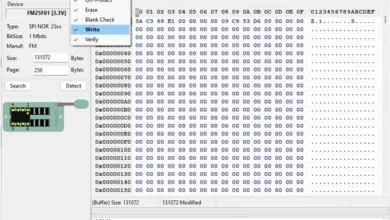
- What it is: Graphical tool for reading, erasing, writing, and verifying serial memory chips. Originally for USBasp, later expanded to support CH341A, CH347, FT232H, Arduino, AVRISP-MKII, etc.
- License: MIT (open source).
- Key sources:
- Original / main: github.com/nofeletru/UsbAsp-flash (releases)
- Actively maintained fork with extra features (CH347 support, higher-speed writes, more chip IDs, localization): github.com/therealdreg/asprogrammer-dregmod
- Usage notes:
- Portable (extract and run).
- Select Hardware → CH341a, then choose the IC (or use the Read ID / auto-detect button for SPI).
- Supports protection register handling (unprotect).
- Works well with both official WCH drivers and (in some setups) libusb/WinUSB via Zadig.
- Pros: Free, open-source, multi-programmer support, reliable for everyday SPI/I²C work.
- Cons: Older main releases can feel dated; some users prefer the dregmod fork.
2. NeoProgrammer
- Enhanced/fork-style tool based on AsProgrammer ideas, popular in the community for CH341A (black/green boards).
- Shows connection diagrams for the selected chip and has a binary viewer.
- Versions around 2.2.0.10 are commonly referenced.
- Caveats: Not fully open-source in the same way; distribution is often via forums or third-party sites. There have been occasional reports of suspicious packages, so download carefully and scan files. Prefer sources that match known hashes when possible.
- Many technicians use it successfully for BIOS and EEPROM work.
3. SNANDer (command-line)
- Open-source CLI tool focused on SPI NOR/NAND + EEPROM (CH341A-based).
- GitHub: github.com/McMCCRU/SNANDer
- Uses libusb (not the official WCH driver). Install/replace the driver with Zadig → select the CH341A device (VID:PID 1A86:5512) → choose libusb-win32 or WinUSB.
- Simple commands (-i for ID, -r read, -w write + -v verify, -e erase, etc.).
- Good for scripting and when you prefer a lightweight CLI.
4. Other notable Windows options
- CH341A/CH347 Programmer by Shichang Zhuo — open-source GUI supporting both CH341 and the faster CH347. Available via shared drives linked from community posts.
- Original / bundled “CH341A Programmer” — the classic Chinese utility that often comes with the hardware. Functional but older and less polished.
- EEFlasher — modern cross-platform (Windows/Linux) replacement aiming to improve on AsProgrammer (cleaner UI, faster writes, cancellation support, hex editor, etc.). Supports CH341A/CH347 and others.
- CH341A tool (tomeko.net / GitHub tomek-o/CH341A-tool) — adds extra functionality beyond pure memory programming (I²C device detection, sensors, GPIO, Smart Battery info, OLED/display control, etc.). Requires the CH341PAR driver.
- flashrom — powerful cross-platform CLI (Windows builds exist). Excellent chip database; uses libusb. Great for Linux primarily, but usable on Windows.
Drivers
- Official WCH:
- CH341SER (serial/UART)
- CH341PAR (parallel / SPI-I²C programmer mode) — usually the important one for these tools.
- Download from the manufacturer site (wch.cn or wch-ic.com).
- libusb / WinUSB (for SNANDer, flashrom, some AsProgrammer setups): Use Zadig. Select the correct device carefully.
- Close other CH341A tools before switching drivers.
Practical tips
- Always make a verified backup (read twice and compare checksums) before erasing or writing.
- Voltage matters: Many black CH341A boards put 5 V logic levels on the bus even when the socket is 3.3 V. Prefer boards with a voltage switch (3.3 V / 5 V) or use level-shifting / 1.8 V adapters when needed. Some chips (especially modern 1.8 V BIOS) require care.
- Use a short, good-quality USB cable; avoid hubs and VMs when possible.
- Chip orientation and clip contact quality are common failure points.
- For in-circuit programming, power the target carefully (or power it from the programmer only).
Recommendation summary
- Everyday GUI use → AsProgrammer (or its dregmod fork) with official drivers.
- CLI / scripting / NAND support → SNANDer.
- Modern alternative → check EEFlasher.
- Extra I²C/sensor features → CH341A tool.
These tools make the inexpensive CH341A surprisingly capable for hobbyist and repair work. Always double-check chip datasheets for voltage and pinout before connecting.