Starsat Sr 2000hd Hyper old & New Software
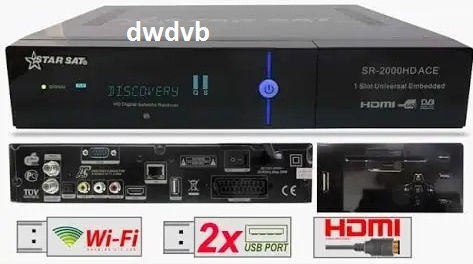
Download Starsat SR-2000HD Hyper old and new software, including V2.81, V2.80, V2.79, V2.78 and older firmware versions.
Starsat SR-2000HD Hyper Old & New Software Download
Starsat SR-2000HD Hyper software? On this page, you can find a collection of old and new software versions for the Starsat SR-2000HD HYPER satellite receiver.
The software archive includes newer versions such as V2.81, V2.80, V2.79, V2.78 and V2.77, as well as many older firmware releases. Always check your receiver model and hardware information before installing firmware.
Starsat SR-2000HD Hyper Latest Software
The latest software list available on DWDVB includes:
Starsat Sr 2000hd Hyper,
Starsat Sr 2000hd Hyper old & New Software
Starsat SR-2000HD Hyper V2.05
An older DWDVB entry for V2.05 lists Wi-Fi/3G USB and line support and references functions including IPTV and various network-related services. It also lists the STB/ALI version as V2.05.
| Name & Version | Software List |
| SR-2000HD HYPER V2.85 | |
| SR-2000HD HYPER V2.82 | |
| SR-2000HD HYPER V1.09.26148 | |
| SR-2000HD HYPER V2.63 date: 25-08-20 | |
| SR-2000HD HYPER V2.63 date: 21-08-20 | |
| SR-2000HD HYPER V2.62 date: 23-07-20 | |
| SR-2000HD HYPER V2.59 date: 17-04-20 | |
| SR-2000HD HYPER V2.59 date: 17-04-20 | |
| SR-2000HD HYPER V2.57 date: 11-03-20 | |
| SR-2000HD HYPER V2.55 Ali3511 | |
| SR-2000HD HYPER V2.54 | |
| Starsat SR-2000HD HYPER V2.53 | |
| Starsat SR-2000HD HYPER V2.52 | |
| Starsat SR-2000HD HYPER V2.50 | Downlaod |
| Starsat SR-2000HD HYPER V2.48 | |
| Starsat SR-2000HD HYPER V2.47 | |
| Starsat SR-2000HD HYPER V2.46 | |
| Starsat SR-2000HD HYPER V2.43 | |
| Starsat SR-2000HD HYPER V2.42 | |
| Starsat SR-2000HD HYPER V1.78 | |
| Starsat SR-2000HD HYPER encrypt V1.92 | |
| Starsat SR-2000HD HYPER encrypt V1.93 | |
| Starsat SR-2000HD HYPER V2.40 | |
| Starsat SR-2000HD HYPER V2.39 | |
| Starsat SR-2000HD HYPER V2.38 | |
| Starsat SR-2000HD HYPER V2.36 | |
| Starsat SR-2000HD HYPER V2.34 | |
| Starsat SR-2000HD HYPER V2.33 | |
| SR-2000HD HYPER V2.32 | |
| Starsat SR-2000HD HYPER V2.31 | |
| Starsat SR-2000HD HYPER V2.30 | |
| Starsat SR-2000HD HYPER V2.29 | |
| Starsat SR-2000HD HYPER V2.28 | |
| Starsat SR-2000HD HYPER V2.27 | |
| Starsat SR-2000HD HYPER V2.26 | |
| Starsat SR-2000HD HYPER V2.25 | |
| Starsat SR-2000HD HYPER V2.24 | |
| Starsat SR-2000HD HYPER V2.23 | |
| Starsat SR-2000HD HYPER V2.22 | |
| Starsat SR-2000HD HYPER V2.19 | |
| Starsat SR-2000HD HYPER V2.17 | |
| Starsat SR-2000HD HYPER V2.15 | |
| Starsat SR-2000HD HYPER V2.13 | |
| Starsat SR-2000HD HYPER V2.10 | |
| Starsat SR-2000HD HYPER V2.05 | |
| Starsat SR-2000HD HYPER V2.04 | |
| Starsat SR-2000HD HYPER V2.03 | |
| Starsat SR-2000HD HYPER V1.90 | |
| Starsat SR-2000HD HYPER V1.89 | |
| Starsat SR-2000-HD HYPER V1.75 | |
| Starsat SR-2000hd Hyper V1.73 Back to Original | |
| Starsat SR-2000HD HYPER V1.72 Error114 VirusDz | |
| Starsat SR-2000HD HYPER V1.71 | |
| Starsat SR-2000HD HYPER V1.70 | |
| Starsat SR-2000HD HYPER V1.66 | |
| Starsat SR-2000HD HYPER V1.64 | |
| Starsat SR-2000HD HYPER V1.62 | |
| Starsat SR-2000HD HYPER V1.61 | |
| Starsat SR-2000HD HYPER V1.60 | |
| Starsat SR-2000HD HYPER V1.59 | |
| Starsat SR-2000HD HYPER V1.58 | |
| Starsat SR-2000HD HYPER V1.55 | |
| Starsat SR-2000HD HYPER V1.54 | |
| Starsat SR-2000HD HYPER V1.53 | |
| Starsat SR-2000HD HYPER V1.52 | |
| Starsat SR-2000HD HYPER V1.51 | |
| Starsat SR-2000HD HYPER V1.48 | |
| Starsat SR-2000HD HYPER encrypt V1.89 (16156) | |
| Second-install-SR-2000HD HYPER V1.75 | |
| Hyper Converted Menu back to original by USB | |
| Starsat SR-2000HD Back To Original Via USB | |
| Starsat SR-2000HD Hyper Final Downgrade | |
| Starsat SR-2000HD HYPER V1.46 | |
| Starsat SR-2000HD HYPER V1.45 |
How to Install Starsat SR-2000HD Hyper Software
Before upgrading the receiver, make sure the firmware is intended for the exact SR-2000HD Hyper model.
- Download the required software file.
- Extract the file if it is compressed.
- Copy the firmware file to a compatible USB flash drive.
- Connect the USB drive to the receiver.
- Open the receiver’s software/upgrade menu.
- Select the firmware file.
- Start the upgrade process.
- Do not switch off the receiver while the upgrade is running.
- After installation, allow the receiver to restart.
- Check the software version from the receiver’s system information menu.

