stb Erom upgrade 2.1.0 Tools rs232
stb erom upgrade 2.1.0 Toils rs232 All Set Top File Update.
All RECEIVER LOADER / STB UPGRADE TOOLS Download
STB EROM Upgrade (including version 2.1.0 references) is a Windows tool for loading/upgrading firmware on satellite set-top boxes (STBs) and receivers via the RS232 serial port.
It is commonly used for ALI-chipset and similar receivers (e.g., certain Ferguson/Ariva, Solovox, and other China/Europe boxes) when USB upgrade fails or the box is bricked (“ASH” state, no display, etc.). The tool communicates over a null-modem / crossed RS232 cable (or USB-to-RS232 adapter) and supports .abs (or similar) firmware files. Related loaders and tools are often listed alongside it on satellite firmware sites.
Typical usage (based on common guides for EROM Upgrade / similar RS232 loaders)
- Hardware
- Null-modem (crossed) RS232 cable or USB-Serial adapter (e.g., CH340).
- Identify the correct COM port in Windows Device Manager (Ports COM & LPT).
- Software setup
- Run EromUpgrade.exe (or the equivalent executable from the package).
- Select the correct COM port.
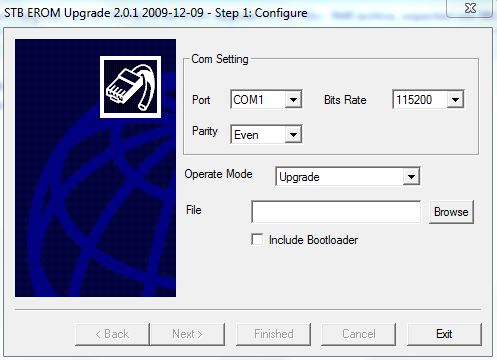
- Common settings: Bit rate 115200, Parity Even, Operate Mode Upgrade.
- Browse to your firmware file (.abs recommended).
- Optionally check “Include Bootloader” (use with caution — may require re-entering STB ID afterward).
- Process
- Power off the STB (rear switch if available).
- Connect the cable.
- Click Next / Start in the tool → it shows “Synchronizing STBs… Please reset target!”
- Power on the STB.
- The tool should show “Done” and begin transferring/writing the firmware (several minutes). Do not interrupt power.
- After success, power-cycle the box and disconnect the cable.
Guides for closely related versions (2.0.0c / 2.0.1 and Solovox-style EROM tools) follow essentially the same steps.
Where to look for the tool
Satellite/DVB download sites (e.g., dwdvb.com and similar “China Box Software” / loader collections) list STB EROM Upgrade among many free RS232 loaders. Search those sites or forums for “STB EROM Upgrade 2.1.0” or “EromUpgrade”. Older confirmed versions (2.0.0c, 2.0.1) appear on forums with Mega/MediaFire links; confirm the exact version matches your box model, as some receivers need a specific build.
Warnings
- Wrong firmware or wrong tool version can further brick the box. Always match the file to your exact model/chipset.
- Use a reliable power supply and do not interrupt the write process.
- Antivirus may flag older loaders; scan files carefully.
- Prefer original manufacturer firmware when possible.
|
SR. No.
|
Name of Loader Tool
|
Version
|
Download Link
|
Description
|
|---|---|---|---|---|
| 1 | Sunplus Loader | v 1.5.0.1 | Download | 1506, 1507 |
| 2 | Sunplus Loader | v 1.5.0.8 | Download | 1506, 1507 |
| 3 | ALI 3510c Loader | v 2.2.0 | Download | ALI3510C |
| 4 | ALI 3511 Loader | v 2.0.1 12.2009 | Download | SR-2000HD Hyper |
| 5 | GX6621 Loader+Dump | v 1.00 | Download | SR-2000HD Extreme |
| 6 | ALI3606 Loader | v 1.1.0.5 11.2010 | Download | |
| 7 | GX6628 Loader+Dump | v 1.00 | Download | SR90000HD Extreme |
| 8 | ALI RS232 Upgrade Tool | v 1.2.0 03.2012 | Download | SR-2000HD Hyper |
| 9 | GXD Loader | v 1.010 | Download | SR-8989HD |
| 10 | Multi Tool Box 2018 | By Azhar&Shahid | Download | |
| 11 | Ali Upgrade Tool |
V3.1.1 |
Download | |
| 12 | UART Upgrade Tool | v 2.2.3.113 | Download | |
| 13 | STB EROM Upgrade | v 2.0.0c 05.2009 | Download | SRT-2016 Extra |
| 14 | ALI3602 Loader | v 1.1.08 | Download | |
| 15 | GX Multi Loader | V1.117 | Download | |
| 16 | SR-B10-C10-S10-M20HD | v 2.1.0 02-2013 | Download | Starsat & Clone |
| 17 | GXDownloader | v 1.0.3.2 | Download | GX6605S |
| 18 | ALI3510 Logo Changer | By IK | Download | |
| 19 | Starmax 35xx Loader | v4.0.0 03-2015 | Download | A100-A20-X20 |
| 20 | Universal Toolbox | By Shahid Ali | Download | |
| 21 | Background Changing Tools ALI35XX-ALI36XX | Download | ||
| 22 | GXDownloader_boot | V1.0.3.2 | Download | |
| 23 | GXDownloader_boot | V1.1.1.2 | Download | |
| 24 | GXDownloader_boot | V1.008 | Download | |
| 25 | Hex Worksop | Download | ||
| 26 | Loader Starsat SR-8989 and SR-6969 Vega | Download | SR-8989 and SR-6969 Vega | |
| 27 | LOGO Changer & Back Viewer | Download | ||
| 28 | NEOSAT BOOT LOGO CHANGER | Download | ||
| 29 | RS232 Upgrade Loader Tool M3510 | Download | M3510 | |
| 30 | SR-8989HD_PRIME_loader | Download | SR-8989HD | |
| 31 | Tiger_i400pro_Loader | Download | Tiger_i400pro | |
| 32 | 20_Upgrade_tool | Download | ||
| 33 | 3612 Upgrade Tool 1.1.08 | Download | ||
| 34 | A16-Loader_Tool | Download | ||
| 35 | ALI_Bootloader_Tiger T8 High Class | Download | ||
| 36 | ALI3328 Loader | Download | ||
| 37 | ALI3329 Loader | Download | ||
| 38 | ALIMUPG70 | Download | ||
| 39 | ALIMUPG610 | Download | ||
| 40 | All In One %2835xx %26 36xx%29 Channel Editor FULL HD Ver 7.95 | Download | ||
| 41 | Erom Upgrade For Ali 3601 3606 | Download | ||
| 42 | Multi Toolbox by IK | V2.0 | Download | |
| 43 | STB_Toolbox3.0 | V3.0 | Download | |
| 44 | Loader AZFOX S3S Recovery | Download | ||
| 45 | Loader HD 6699E 6199E 3058E 3158E | Download | ||
| 46 | Loader_TIGER-T800 PLUS | Download | ||
| 47 | Starmax RS232 Loader | V7 | Download | |
| 48 | Microbox Default Loader for Flash programming | Download | ||
| 49 | Neosat 550 HD Loader | Download | ||
| 50 | New Ali Upgrade | Download | ||
| 51 | Sky 19 Scorpion Loader | Download | ||
| 52 | Star Track Platinum1 HD Loader | Download | ||
| 53 | Starsat Flash Tool | Download | ||
| 54 | StarTrack GALAXY II HD_Loader | Download | ||
| 55 | StarTrack HD BOX 1000_Upgrade Loader | Download | ||
| 56 | StarTrack SRT-2015 HD PLUS_Loader | Download | ||
| 57 | SX2010_Upgrade tool_3.98a | Download | ||
| 58 | Universal Loader 2.0.0b | Download | ||
| 59 | Universal Loader For Ali Chip Upgrade | Download | ||
| 60 | Upgrade 2.0.0b MPG4 | Download | ALI M3105D | |
| 61 | Upgrade Tool Ali3612 | Download | ||
| 62 | Upgrade Ver 4.0.1 | Download | ||
| 63 | Upgrade_1.1.05 ALI3606 | Download | ||
| 64 | Upgrade_Twin | Download | ||
| 65 | StarTrack SRT-150 HD_Loader | Download | ||
| 66 | TIGER G550 HD_ Loader | Download | ||
| 67 | ALI3510 EROM Upgrade | V 2.2.1.0 | Download | ALI3510D |
| 68 | Tiger T3000 Extra 4K | Download | Tiger 4k | |
| 69 | Gx6605 Tool Box | By Ikram Dirujii | Download | GX6605 |
| 70 | Starsat Hyper Tool | By Ikram Dirujii | Download | SR-2000HD Hyper |
| 71 | ALI3510 Important Tools | By Ikram Dirujii | Download | ALI3510 |
| 72 | SR-M20-Loader | Download | ||
| 73 | Stb Loader All In One | By Ikram Dirujii | Download | |
| 74 | SUNPLUS 4Mb&8Mb | By X Team | Download | |
| 75 | TELE_Tool_Hi37xx.V1.00 | V1.0 | Download | |
| 76 | Sunplus Loader v 1.05.09 | V1.05.09 | Download | |
| 77 | Sunplus Loader V 1.5.2.04 | V1.5.2.04 | Download | |
| 78 | SR-2100 HYPER Loader | Download | ||
| 79 | SR-3020 HD LOADER | Download | ||
| 80 | SR-90000 HD EXTREME Loader | Download | ||
| 81 | 1506TV Loader | V1.6.3.9 | Download | 1506TV |
| 82 | Ali 36xxx_RS232_Upgrade_Tool | V1.2.0 | Download | |
| 83 | ALI Mini Upgrade Ali3602 | V7.0 | Download | Ali3602 |
| 84 | StarSat_SR-98HD Prime_M3510C | Download | M3510C | |
| 85 | StarSat SR-X95 USB MEGA | Download | ||
| 86 | Starsat SR-2200HD Loader | Download | ||
| 87 | Starsat SR-2000 HD ACE Loader | Download | ||
| 88 | Starsat Extreme 2000 loader | V 1.0.3.2 | Download | |
| 89 | Star Track Platnum1 HD Loader | Download | ||
| 90 | All Mediastar Loader | V2.3 | Download | |
| 91 | MediaStar ALI Loader | V2.0 | Download | |
| 92 | Starsat-SR-M10-Loader | Download | ||
| 93 | ALL STARSAT 2TUNER ALIUP_V1.2.0 | Download | ||
| 94 | GX6605s Loader With New Boot | V1.031 | Download | |
| 95 | Gx6605s Loader | V1.21 | Download | |
| 96 | Gx Loader V 1.32 | V1.32 | Download |
watch the video Click Here
Explain RS232 serial protocol details
Here’s a clear visual representation of the classic STB EROM Upgrade tool interface (the Windows EromUpgrade.exe used for RS232 firmware loading on many satellite STBs):
The tool window typically looks like this:
- Title bar: EromUpgrade or STB EROM Upgrade
- Main fields:
- Port: dropdown (COM1, COM3, COM11, etc.)
- Bits Rate: 115200
- Parity: Even
- Operate Mode: Upgrade (or Data Dump for backup)
- File: Browse button → select your .abs firmware
- Checkbox: Include Bootloader
- Big Next button at the bottom
- Status messages appear after clicking Next:
“Synchronizing STBs… Please reset target!” → “Done” → progress bar during transfer/burning
Typical screens during use
- Initial setup screen – Port / Rate / Parity / Mode / File selection
- Synchronizing screen – waiting for you to power-cycle the STB
- Progress / Burning screen – percentage or progress bar while writing flash
- Finished screen – success message + “Finished” button
Would you like me to generate a more detailed mock-up image of the exact interface (with specific version 2.1.0 styling if you prefer), or do you need screenshots of the connection cable / COM-port setup instead? Just say the word!


